Nova Ses
Your own voice chat server: talk with your gaming friends in rooms
A voice chat server you install on your own computer. Open rooms, set passwords, share the invite link; your friends connect with the free app and talk. Voices go through your computer, not through our servers.
No sign-up needed · Windows · v0.1.0 · 10 MB
-
Idea
-
Planning
-
In development
-
Beta
-
Released
Product overview
Your own server for talking while you play
You don't need someone else's server to talk with your teammates in game. Install Nova Ses on your computer, open your rooms and share the invite link with your friends. Voices are distributed from your own computer; your conversations never pass through our servers or anyone else's.
How it works
- Download and install. One installer sets up both the server and the app for connecting. The server runs quietly with a small icon next to the clock; the admin panel opens in your browser.
- Open your rooms. Create rooms like "General Chat" or "Team A", and add a password if you like.
- Share the invite link. Every room has a ready link; send it on WhatsApp, your friend clicks it and Nova Ses opens straight into the room.
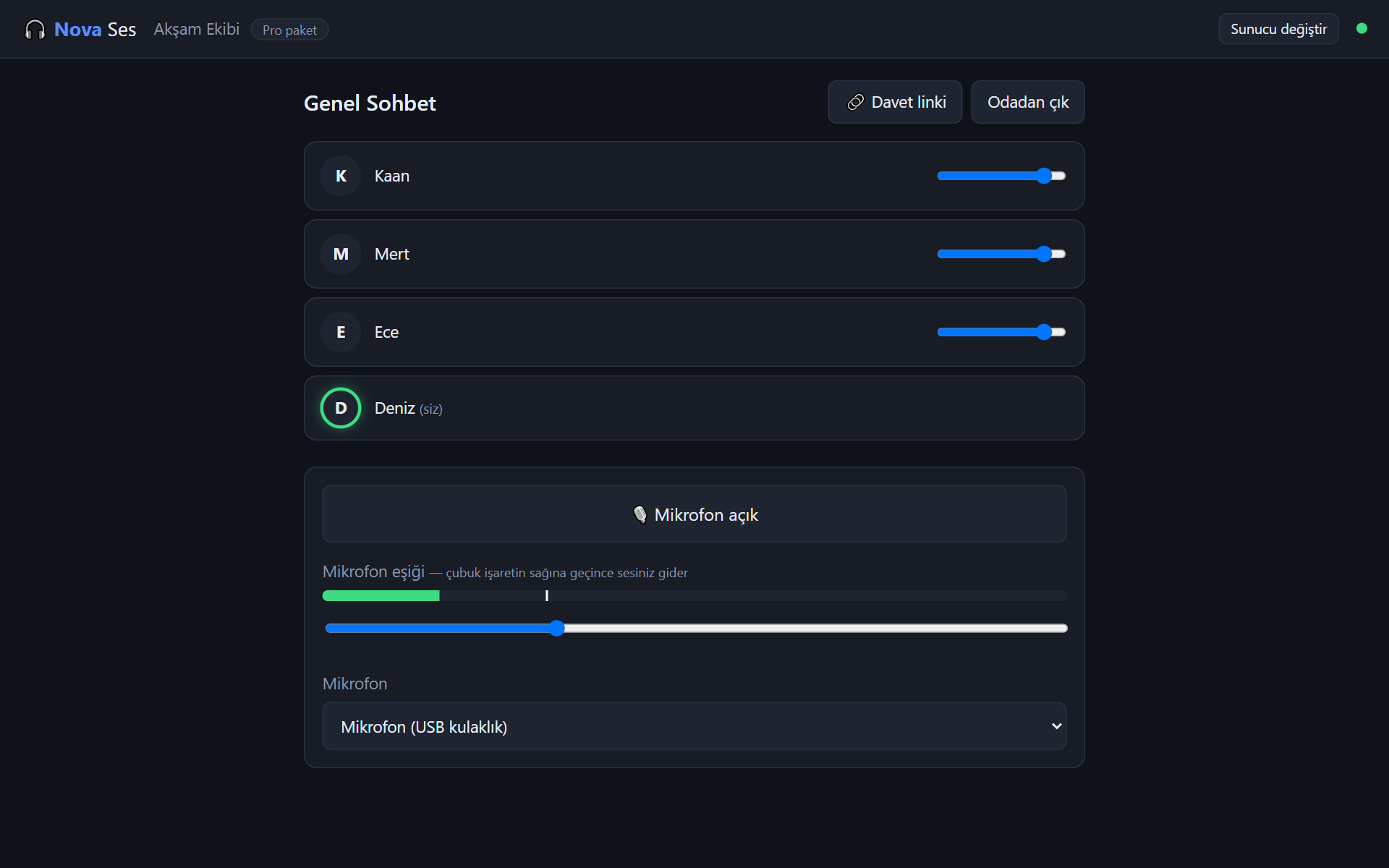
- Talk. No push-to-talk: the microphone is open and only sends sound while you speak. The speaker's icon lights up green.
What's included
- Open microphone with a smart threshold: fan, keyboard and room noise stay out; you set the threshold with a slider.
- Echo and noise cancellation: sound from your speakers doesn't go back into the microphone.
- Per-person volume and muting yourself.
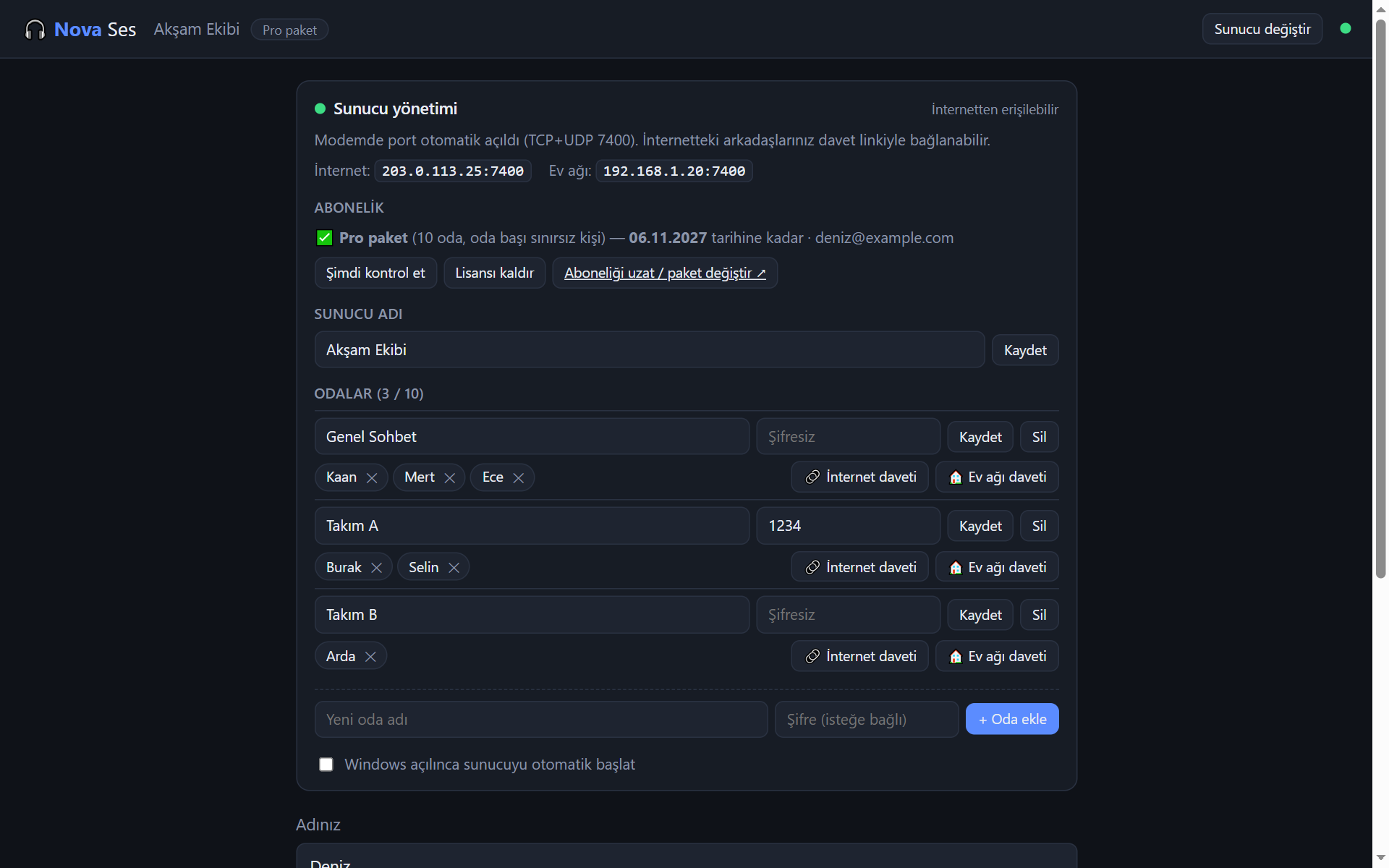
- Password-protected rooms; the password can be included in the invite link.
- Admin panel: add, rename, set a password on or delete rooms; remove someone from a room; name your server.
- Automatic port opening (UPnP): on most routers you need no settings for access from the internet. If yours doesn't support it, the panel tells you step by step what to do.
- Starts automatically with Windows.
- Light on bandwidth: about 50 kbps per speaker; an ordinary home connection is enough for a room of 10.
Packages
- Free: 1 room, 3 people per room. No time limit.
- Standard: 5 rooms, 15 people per room — €2.90 / month or €29 / year (2 months free).
- Pro: 10 rooms, no limit on people — €5.90 / month or €59 / year (2 months free).
Only the person who runs the server subscribes; your friends connect with the free app. The subscription is added to your novapp account; you activate it by signing in with your account under "Subscription" in the server's admin panel. If it ends, your server doesn't stop: it keeps running on the free package.
Good to know
- The computer running the server must be on.
- Some internet lines use a shared IP (CGNAT); then nobody can connect from outside. The panel notices this and warns you; you can ask your provider for a "public IP". People on the same home network can always connect.
- The installer is not digitally signed yet, so Windows may show an "unrecognized app" warning: choose More info → Run anyway.
System: Windows 10 / 11 (64-bit), about 30 MB of disk space. The server uses very few resources (1–3% of the CPU for up to 50 people).
Start free: download and install, and your server runs on the free package right away. Subscribe to Standard or Pro for more rooms and people.
Key features
- Your own voice chat server, installed on your computer
- Rooms, password-protected rooms and one-click invite links
- Open microphone: sound only goes out while you speak (adjustable threshold)
- Echo and noise cancellation, per-person volume
- Admin panel: add/delete rooms, passwords, removing people
- Automatic port opening on your router (UPnP) and CGNAT warning
- Voices go through your computer, not through our servers
- Your friends connect with the free app
- Free package: 1 room, 3 people — no time limit
Screenshots